The entire infrastructure of your events. From invitation to final report.
Registration, badges, check-in, program, activities, live monitoring and reports: one tool, one attendee database. What happens on the ground shows up in your dashboard, the second it happens.
What it is
Not a check-in app. Not an event CRM.
Bifrost Events is the technology layer shared by your whole event. Every module — registration, check-in, program, interactions, analytics — writes to the same attendee database. That is what makes every stage measurable, and every decision faster.
01 — Before
Prepare
- Registration page in your brand
- Custom attendee fields
- Emails and QR badges
- Program, rooms, speakers
02 — During
Operate
- Scan check-in
- Real-time attendance
- Interactive room activities
- Built-in webinars
03 — After
Understand
- AI digests per activity
- Reports and exports
- Automated follow-ups
- Unified attendee history
01 — Before the event
How does registration work?
A registration page that feeds everything else.
Pick a template — there are ten, from minimal to premium —, apply your colors, publish. Form fields are composed from a catalogue: job title, company, dietary needs, whatever your event requires. Existing lists import from Excel.
- Ten registration page templates
- Fields chosen per event, from a shared catalogue
- Excel import and export of attendees
- Automatic confirmation with a personal QR badge
Before
A generic form, lists stitched together by hand, confirmations sent one by one.
With Bifrost
A branded page, a single list, a confirmation email with badge on every registration.
Result
The attendee database is clean from day one — the same one used for check-in, activities and reports.
01 — Before the event
What does your event look like?
Your brand at every touchpoint.
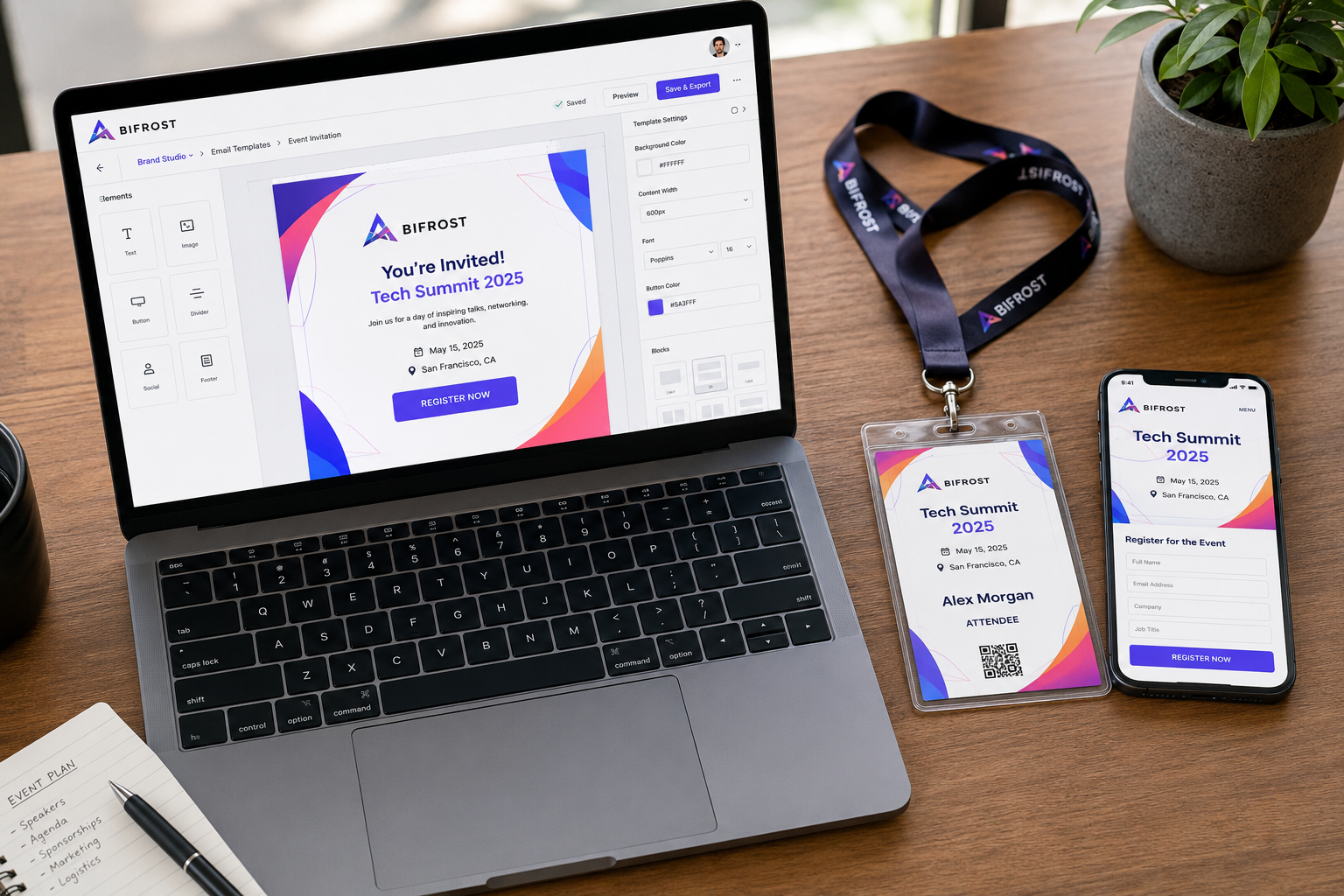
The Studio controls the appearance of everything attendees see: the registration page, the four email templates — with preview and test send — and the badge. The QR code itself is customizable: style, colors, embedded logo.
- Registration page editor, per event
- Four email templates, preview and test send
- Custom badge and QR: style, colors, logo
- No Bifrost branding on the attendee side
02 — During the event
How does check-in work?
One scan. Identity verified, attendance recorded.
Every attendee arrives with a QR badge — encrypted, so it cannot be forged. The front-desk app scans it: the identity appears, attendance is timestamped to the second, with the welcome desk it came from. Check-out works the same way.
- A dedicated mobile app for front-desk teams
- Server-encrypted QR codes — no forgeable badges
- Multiple desks: every entry point is identified
- Every scan visible in the dashboard within a second
Before
Paper lists, Excel tallies, queues — and no certainty about who is actually there.
With Bifrost
One scan per attendee, identified welcome desks, timestamped attendance.
Result
You know who arrived, when and through which door — while it happens, not three days later.
02 — During the event
How does the audience participate?
A living program, rooms that answer back.
Sessions, rooms, speakers: the program is built in the platform and follows attendees on their phone. In the room, you launch polls, quizzes, Q&A and word clouds — results live. Zoom webinars run inside the event, not next to it.
- Program, rooms and speakers in one place
- Polls, quizzes, Q&A, word clouds, abstracts, 360 VR
- Identified, guest or anonymous participation
- Built-in Zoom webinars
02 — During the event
What do you see while it happens?
The live event, in numbers.
Registered, attendance rate, people on site right now, activity participation: the overview updates on every scan and every vote, over websockets. No refresh, no noon export — the actual state of the event, continuously.
- Attendance and arrivals, live
- Registration curve and arrival dynamics
- Participation per activity, to the second
The overview during a live event
03 — After the event
What do you do with everything the event produced?
Heimdall reads the results. You make the decisions.
For every activity, Heimdall generates a decision-grade digest: executive summary, indicators compared to benchmarks, strong signals, risks, recommended actions — and a confidence level based on data quality.
Each activity type gets its own reading: satisfaction and sentiment for polls, a mastery index for quizzes, recurring themes for Q&A, idea clusters for word clouds.
- One digest per activity, generated on demand
- In the language you choose: French, English, Arabic
- PDF export, ready to share
- Creation assistance: descriptions, quizzes, polls, visuals
The numbers are computed by the platform. The AI interprets and writes — never the other way around.
Before
Three weeks after the event, a fifty-page report nobody opens.
With Bifrost
One digest per activity, generated in minutes, in the recipient's language.
Result
The debrief happens while the decisions are still open.
03 — After the event
How does the data come out?
Everything that happened, exportable.
The reports center crosses registrations, attendance, activities, geography and devices. Every view exports — Excel for lists, PDF for digests — and a notification tells you when the file is ready.
- Registration dynamics: daily, hourly, cumulative
- Detailed participation per activity
- Geographic breakdown: country, city, region
- Excel and PDF exports, generated in the background
Before · during · after
What runs on its own?
Rules, not reminders in your calendar.
A registration submitted, an activity created, a participation recorded: each trigger can send an email, a push notification or a confirmation — to one attendee or all of them. With conditions, and a log of every run.
- Triggers: registration, activity, participation
- Actions: email, push, notification, confirmation
- Every run traced in a history
The foundation
Built for organizations, not for a single event.
Under every event, the same infrastructure.
Multi-account, precise roles
Isolated accounts within an organization or agency. Seven roles, some sixty permissions: everyone sees exactly what they should.
Three languages, native RTL
Organizer and attendee interfaces in French, English and Arabic — right-to-left included.
Real time, end to end
Scans, registrations and votes are broadcast over websockets to every connected screen.
Three applications
A web dashboard for your teams, an attendee mobile app — badge, program, activities — and a front-desk app for check-in.
Dedicated instance available
Your data can live in an instance strictly separated from other clients, administered through a dedicated console.
Tamper-proof badges
QR codes are encrypted server-side: a badge cannot be copied or guessed.
See it on your own event.
A thirty-minute demo, on your case: your formats, your volumes, your constraints.